Introduction to Nyxora
Nyxora is a Secure AI execution framework designed specifically for Web3 agents. It does not operate as a mere chatbot; rather, it serves as the runtime infrastructure for autonomous on-chain agents.
Built with Node.js for the backend and React for the dashboard interface, Nyxora focuses on two primary pillars: Advanced Automation and Absolute Security (Zero-Knowledge LLM).
🌟 Key Features & Advantages
1. Zero-Knowledge Security & Local Cryptography
Nyxora ensures that your Private Key is never transmitted to external AI models like OpenAI, Anthropic, or Gemini. All cryptographic transaction signing occurs locally and in complete isolation using your OS-native Keyring architecture.
2. Multi-LLM Support & API Rotation
Nyxora is an agnostic framework. You can seamlessly switch between models from various providers:
- Google Gemini (
gemini-3.1-pro,gemini-2.5-flash) - OpenAI (
gpt-5.5,o3-mini) - Groq (Ultra-fast LPU inference for Llama 3)
- Mistral AI (
mistral-large-latest) - xAI (
grok-3) - DeepSeek (
deepseek-reasoner) - OpenRouter (Access to thousands of open-source models)
- Ollama (Run AI entirely offline on your local machine)
- Custom Model (Manually define any custom model endpoint)
The system also features Round-Robin API Rotation, automatically rotating up to 10 different API keys to prevent rate limits and token drain.
3. System Automation & Full OS Access
Beyond Web3, Nyxora acts as your native Operating System assistant:
- Modify, read, and analyze local files on your machine.
- Execute terminal commands directly.
- Browse web pages natively. Everything is strictly governed by an NLP Security Policy—security rules written in plain English (e.g., "Never touch the C:/Windows directory").
4. Advanced Web3 Execution (DeFi & Security)
Nyxora goes beyond simple token transfers. It is equipped with pro-trader tools:
- Security Scanner: Before you buy a token, Nyxora uses the GoPlus Labs API to audit the smart contract, detecting honeypots, hidden taxes, or malicious proxy upgrades.
- Automated Limit Orders: You can say "Sell my PEPE if the price drops below $0.001". Nyxora runs a background cron monitor and executes the swap while you sleep.
- "Lean Degen" Auto-Whitelist: Automatically intercepts Contract Addresses (CAs) when you check balances or execute swaps, permanently saving them to a personal tracking list.
- Dynamic Portfolio Engine: Merges standard tokens, custom CAs, and daily CoinGecko trending tokens into a hyper-fast, spam-free Multicall scan for instant Net Worth estimations.
5. Plugin Sandboxing Architecture
Nyxora natively enforces a robust Plugin Sandboxing architecture. If third-party developers create custom skills or extensions for Nyxora, they are executed inside an isolated vm2 sandbox. They are strictly denied unrestricted System Access (File System/Shell/Network), thereby completely neutralizing Supply Chain Attacks.
📐 Architecture Workflow
This architecture is designed to enforce maximum security while maintaining seamless automation.
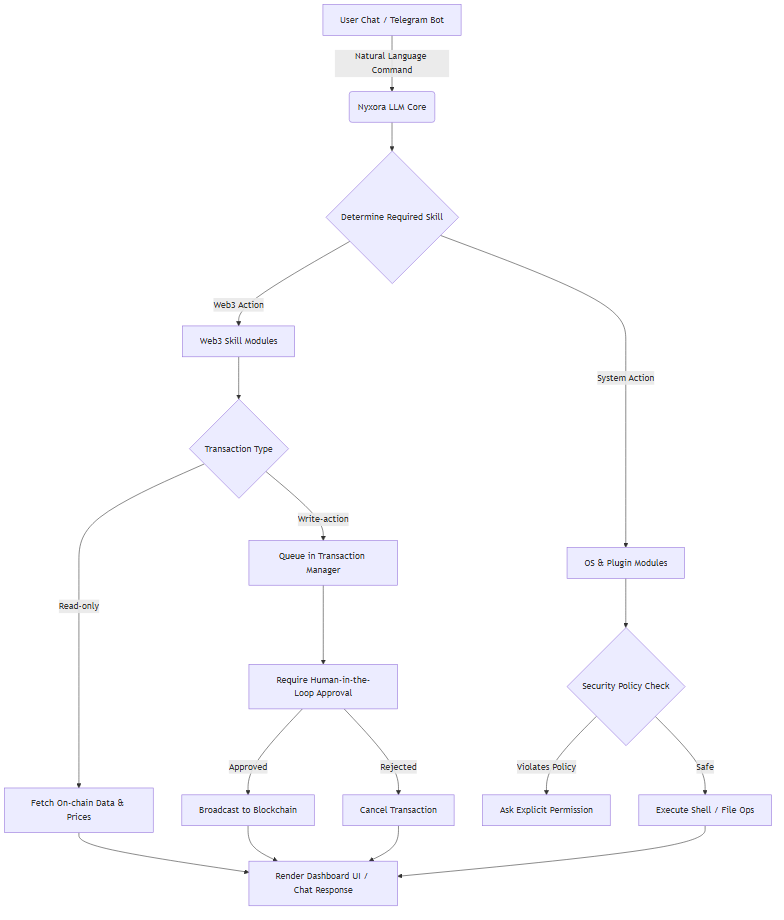
The Execution Flow (Outflow Explanation)
Input & NLP Parsing: It all starts when a user sends a natural language command via the Web Dashboard or Telegram Bot (e.g., "Buy 1 ETH" or "Read my system logs"). This text is routed directly to the Nyxora LLM Core.
- Context Overrides Defaults: If the command contains specific routing details (e.g., "Swap on Arbitrum using Li.Fi"), the NLP engine dynamically overrides any global Dashboard defaults, executing the specific intent without permanently altering your background configurations.
Determine Required Skill: The LLM acts as the central brain, determining which specialized module is needed. It splits into two main branches:
- Web3 Action: If the user wants to interact with the blockchain.
- System Action: If the user wants to interact with the local Operating System.
Web3 Execution Branch:
- The LLM forwards the intent to the Web3 Skills Module.
- It then checks the Transaction Type.
- Read-Only: For queries like checking balances or prices, the agent immediately fetches the on-chain data and renders it back to the user interface.
- Write-Action: For sensitive actions (Swap, Transfer, Mint), the transaction is Queued in the Transaction Manager. It strictly requires Human-in-the-Loop Approval.
- If Approved by the user: The transaction is signed and broadcasted to the blockchain.
- If Rejected: The transaction is safely cancelled.
System Execution Branch:
- The LLM forwards the intent to the OS & Plugin Modules.
- Before any shell command or file operation runs, it must pass the Security Policy Check.
- Safe: If the action complies with your NLP security rules, the shell/file ops are executed directly.
- Violates Policy: If the agent tries to do something forbidden (e.g., touching restricted folders), it halts and asks for explicit permission.
Final Output: Regardless of the branch taken, all outputs, transaction receipts, or command results are formatted beautifully and sent back to the Render Dashboard UI / Chat Response.