Technical Architecture
Nyxora operates on a highly secure, modular Monorepo architecture designed to strictly separate the intelligence (LLM) from the cryptography (Wallet).
By isolating concerns across three separate processes, Nyxora ensures that even if the AI is manipulated via advanced Prompt Injections, it remains physically impossible for it to steal funds.
The 3-Tier Defense System
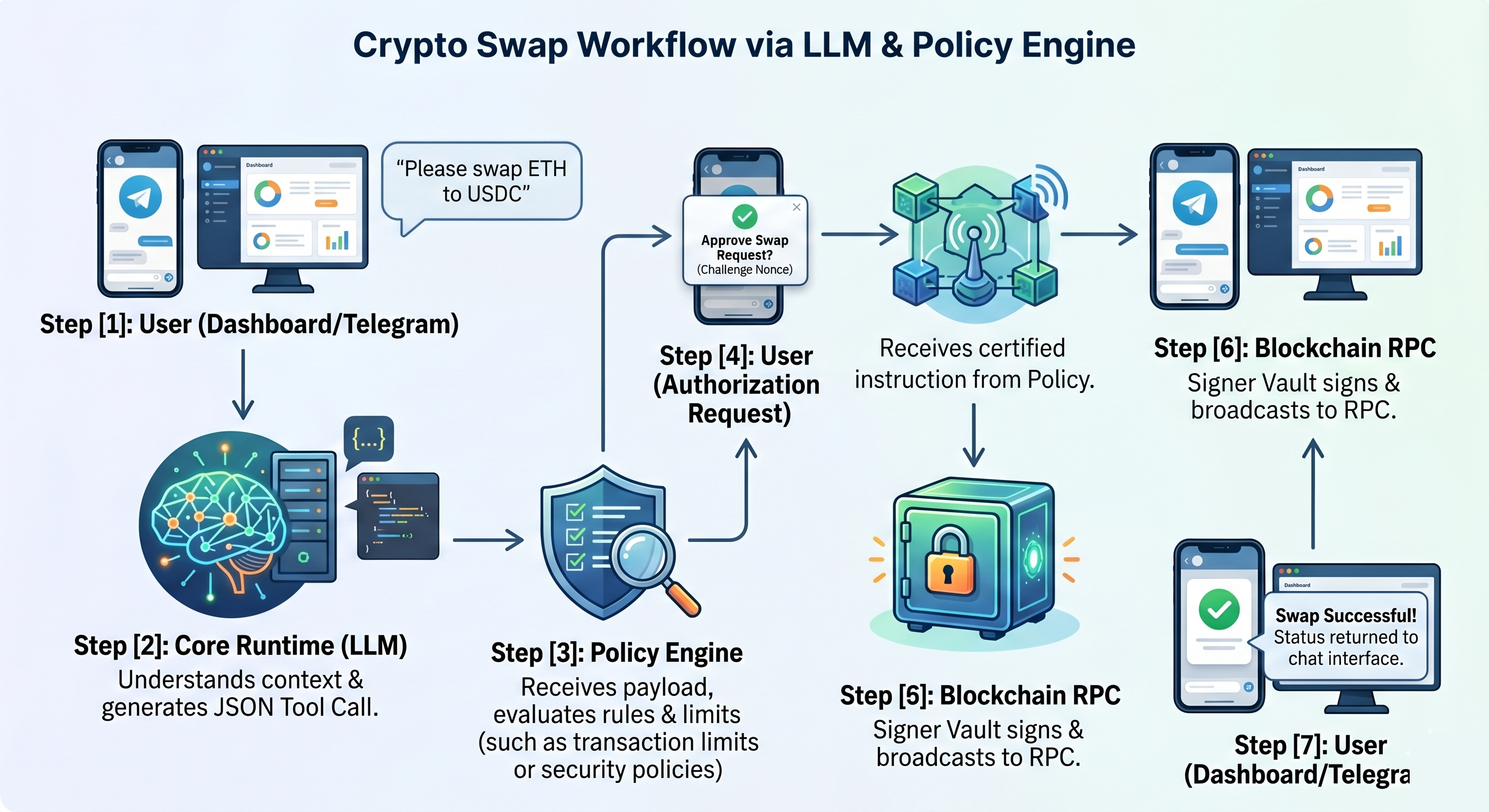
When you launch Nyxora via the background daemon (nyxora start), the launcher orchestrates three independent Node.js processes that communicate internally.
1. Core Runtime (The Brain) - Port 3000
The Core is the front-facing gateway. It serves the Dashboard UI, connects to the Telegram Bot API, and houses the LLM orchestration logic.
- Role: Analyzes user intent, reads memory, and builds transaction payloads (unsigned drafts).
- NLP Intelligence ("Context Overrides Defaults"): The Core is designed to prioritize your explicit natural language commands over the static Dashboard configurations. If your Dashboard is locked to
BaseandUniswap V2, but you chat via Telegram asking to "Swap on Arbitrum using Li.Fi", the Brain dynamically overrides the default fallback variables in real-time, executing the specific intent without permanently altering your Dashboard settings. - Limitation: It does not know your Private Key and cannot sign transactions.
2. Policy Engine (The Guard) - Port 3001
The Policy Engine acts as a strict middleware firewall between the Brain and the Vault.
- Role: Receives transaction drafts from the Core. It parses the payload and checks it against immutable rules defined in
policy.yaml(e.g., maximum daily spend, whitelisted addresses). - Security: If a transaction exceeds the allowed risk parameters, the Policy Engine drops it immediately.
3. Signer Vault (The Safe) - Unix Socket
The Signer Vault is an ultra-secure, isolated process that holds your Private Key in active volatile memory (RAM).
- Role: Receives validated transactions from the Policy Engine, signs them cryptographically, and broadcasts them directly to the Blockchain RPC.
- Isolation: The Signer Vault does not expose any TCP ports. It listens exclusively on an Inter-Process Communication (IPC) Unix Socket (
/tmp/nyxora-signer.sock). This guarantees that no external network traffic can ever reach the Vault directly.
Transaction Lifecycle (End-to-End)
The overarching flow is: User/Core ➔ Policy Engine (Rules & Approval) ➔ Signer Vault (Key Access & Signing) ➔ Blockchain Network.
1. Transaction Request
Transactions are initially submitted to the Policy Engine via the /request-tx endpoint. The payload contains the transaction type (transfer, swap, bridge), target chain, and execution details (destination address, amount).
2. Policy Evaluation
When the Policy Engine receives a request, it routes it through one of two paths:
- Auto-Approve Bypass: If the transaction is flagged for
autoApprove(for safe internal operations) and carries a valid HMAC signature matching theINTERNAL_AUTH_TOKEN, it bypasses manual approval and flows directly to the Signer Vault. - Manual Approval Path: Otherwise, the system validates the payload against immutable rules in
policy.yaml(e.g., maximum USD spend limit). If the transaction passes, it enters thependingTransactionsqueue and awaits cryptographically verified user approval.
3. Cryptographic Approval
Pending transactions are approved via the /approve-tx/:id endpoint:
- The system demands cryptographic proof consisting of a
nonceand anapprovalHash. - The Policy Engine executes a "Cryptographically Bound Approval" check, matching the provided hash against a strict combination of
txId + nonce + JWT_SECRET. - Upon successful verification, the transaction state upgrades to
approvedand is routed to the Signer Vault.
4. Execution and Signing (Signer Vault)
The Policy Engine communicates with the Signer Vault over a highly secure local Unix Socket (/tmp/nyxora-signer.sock), authorized by a short-lived (1-minute) JWT. Inside the Vault:
- Private Key Access: The private key is securely retrieved, prioritizing the OS Native Keyring (via Rust bindings), or falling back to a strictly permissioned local file (
vault.keychmod 0600). - Nonce Management (Mutex Locks): A robust lock and caching mechanism ensures that concurrent transaction bursts never result in on-chain nonce collisions.
- Web3 Broadcasting: Using the
viemlibrary, the transaction is constructed, signed with the isolated Private Key, and safely broadcasted (sendTransaction) to the target blockchain's RPC.
5. Response and Finality
Once broadcasted, the Signer Vault returns the Transaction Hash (TxHash) back down the pipeline to the Policy Engine, which ultimately delivers the success response to the User Interface.
Background Daemon Lifecycle
Nyxora runs as a true "Local-First" background service, similar to a database daemon or a web server.
Boot Sequence
- OS-Native Key Retrieval: When the
Signer Vaultboots up, it automatically queries theGNOME Keyring(Linux),Keychain(macOS), orCredential Manager(Windows) to retrieve the Private Key securely. - Token Generation: The launcher generates a random 64-byte
INTERNAL_AUTH_TOKENand passes it to the three processes via environment variables. This ensures the processes only trust communication from each other. - Dashboard Access: The launcher also writes a session token to
~/.nyxora/auth.token. When you runnyxora dashboard, the CLI reads this token to grant you seamless access to the UI without requiring a password.
Graceful Shutdown & Zombie Prevention
When you execute nyxora stop or nyxora restart, the CLI manager sends a SIGTERM signal to the process group leader.
The orchestrator intercepts this signal and performs a cascading cleanup—terminating the Core, Policy, and Signer children precisely, and automatically clearing any stale Unix Sockets to prevent EADDRINUSE zombie lockups.
System Autostart
Nyxora integrates natively with your OS boot sequence using nyxora autostart enable. Instead of relying on clunky .bashrc terminal hacks, the CLI generates native OS hooks (e.g., XDG .desktop files on Linux or LaunchAgent .plist files on macOS), guaranteeing the AI is awake and monitoring your portfolio the moment your computer turns on.